


Conduit
4.5646.00 Reviews
App Specs
- Version
- 2.3.2
- Updated On
- License
- Free
- Downloads
- 5,000,000+
- Developer
- Psiphon Inc.
- Categories
- Communication
- Platform
- Android
Screenshots


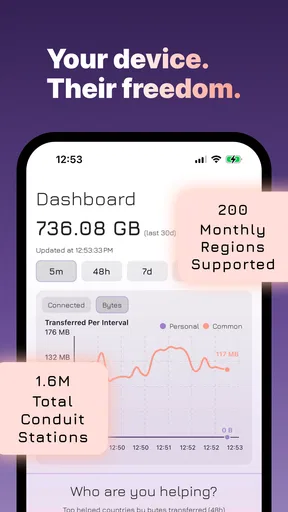

 Analysis by AppCompare
I think Conduit is easiest to understand as a connection tool, not a place to chat. That distinction matters: it is aimed at helping people reach the open internet through a secure connection, rather than replacing a messaging app or organizing your conversations. If a site or service is hard to reach on the network you are using, that can change the practical rhythm of your day—you spend less time retrying the same page and more time deciding whether the connection works for what you need.
When access is the communication problem
Many communication frustrations begin before anyone sends a message. A team page will not load, a useful source is unavailable, or a service you rely on behaves differently on a particular network. Conduit addresses that access problem. It comes from Psiphon Inc., and its purpose makes it most relevant to people who need another route to online information, not to people looking for a new inbox, group chat, or social feed.
That makes the app’s value situational. If your usual connection already gives you dependable access to the sites and services you need, you may not notice much difference in an ordinary session. If access is the obstacle, though, a secure connectivity tool can be a practical part of your toolkit. I would treat it as a way to try to reach material, not as a promise that every page or service will always be available.
How it fits into a working day
Picture a realistic moment: you are on a public connection during a break, trying to check a work resource before replying to a colleague. The useful workflow is to separate the connection problem from the conversation itself. First, use the connectivity app to see whether the resource becomes reachable; then return to the work tool you already use to send your reply. Keeping those jobs distinct helps avoid the mistaken expectation that a connectivity app will also manage messages or coordinate a team.
That separation is also a small attention benefit. Instead of repeatedly refreshing a page while a conversation waits, you can make a deliberate attempt to improve access, check whether it helped, and move on if it did not. I would avoid leaving any connection tool running out of habit when I no longer need it: a focused session makes it easier to notice whether it is solving the current problem, and keeps the app from becoming another background distraction.
Choosing it over familiar alternatives
Compared with a standard messaging app, a secure connectivity utility solves a different layer of the problem. A messenger is the better choice when you need to exchange text, files, or plans with someone; Conduit is relevant when the barrier is reaching an online destination in the first place. A browser may be all you need when pages load normally, while a network troubleshooting step may be more appropriate when the issue is a temporary local connection failure. I would choose this app when access itself is the concern, rather than installing it as a general-purpose communication hub.
There is a trade-off in that narrower role: it may add a step to your routine without changing how you write or organize messages. That is not a flaw if access is the problem, but it can feel unnecessary if your goal is simply to keep in touch. For a family event, for example, a shared calendar or group chat is the natural tool for coordinating time and details. A connectivity app only enters the picture if someone cannot reach the online service the group is using.
Worth Reading Before You Choose

Baby Panda World Brings Quick Play to Modern Phones, but Its Game Library Feels Busy

ESPN’s Live Game View Makes Following Close Games Easier

QuizzLand Review: A Good Fit for Short Trivia Breaks, Not Every Player

Basketball Stars: Multiplayer Is Fast, but Can It Recover When Matches Go Wrong?

WEBTOON Turns Phone Updates Into a Better Reading Routine

Link to Windows Runs on Shared Habits, Not Social Feeds
Using Conduit with intention
I find it helpful to treat this as a purposeful tool: before opening it, I name the page or service I’m trying to reach, then check whether the connection change actually helps. That simple habit keeps troubleshooting from taking over a break or delaying a reply. It also makes the next decision clearer: continue with the resource, try another sensible network check, or use a fallback way to communicate.
Attention, boundaries, and sensible expectations
I would use it with a specific destination in mind rather than treating it as a general fix for every slow or unreliable connection. Try the resource you need, notice whether access improves, and avoid turning repeated retries into a ritual. A failed attempt can have several causes, and changing the connection approach is only one possible step. This measured workflow makes it easier to judge the app on its actual job instead of expecting it to repair a weak signal, resolve an account issue, or improve every online service.
It is also worth keeping boundaries clear. A secure connection does not make every online activity private in every respect, and it does not replace careful choices about what you share, which accounts you use, or whether a page is trustworthy. I would not use any connectivity app as a reason to enter sensitive information on a site I do not recognize. Think of it as one part of reaching the internet, not a substitute for sound security habits.
Conduit is free to install, though in-app purchases range from $9.99 to $99.99 per item. It is rated for Everyone, and the current version is 2.1.4, with Android 7.0 as the minimum operating system requirement. Those details make it worth checking compatibility and purchase options before relying on it; free access to an app does not necessarily mean every optional purchase is irrelevant to your own use. The key question is whether its connectivity role matches a recurring need for you.
Who is likely to find it useful
I can see it fitting people who often move between networks and sometimes find that a resource they need is difficult to reach. It may also suit someone who wants a dedicated connectivity option kept separate from their everyday chat apps. The best reason to try it is a concrete pattern: a particular site, service, or source repeatedly becomes inaccessible in a situation where you need it. If the problem happens only once, basic network checks may be a simpler first move.
On the other hand, I would skip it if what you really want is a messaging platform, a task manager, or a way to silence notifications and protect your attention. It does not answer those needs just because connectivity affects communication. People who need a guaranteed route to a specific service should also keep a fallback plan, such as another approved way to contact a colleague or access essential information. A tool that helps with access is useful, but it should not be the only plan for a time-critical conversation.
What its audience and track record suggest
As a communication-category app, it has an average rating of 4.7 from around 18,000 ratings, and it has been installed over 5 million times. That level of adoption suggests many people have found a reason to try it, but popularity alone cannot tell me whether it will solve a particular network problem. I would judge it by a small, practical test: choose a non-sensitive resource you need, try the app in the situation where access is difficult, and see whether the result is useful enough to justify keeping it in your routine.
It was released on October 28, 2024, and the age rating is Everyone. Those are useful context points, but the deciding factor remains the job you expect it to do. If you are choosing between this and another communication app, start by naming the obstacle: if it is a person-to-person conversation, pick a messenger; if it is trouble reaching online material, this kind of connectivity app is the more relevant category.
A practical verdict
My overall view is that Conduit makes the most sense as a focused utility, not an app you open for entertainment or social interaction. Its strength is the possibility of making an online destination reachable when your usual route is not doing the job. Its limitation is equally clear: it cannot replace the service you are trying to access, and it does not remove the need to make careful decisions about privacy, sensitive information, and backup communication.
If you regularly encounter access barriers, I would give it a considered try and evaluate it against one real need rather than assuming it will improve every connection. If your internet already behaves as you expect, or you are looking for better group conversations and calmer notifications, a different kind of app will serve you better. That is a useful distinction to keep in mind before adding another tool to your phone.
Streamline Your Daily Chaos
Let’s be real—life can get pretty hectic. Juggling work, family, and a social life sometimes feels like a Herculean task. That’s where Conduit steps in. It’s designed to help you streamline your daily tasks effortlessly. No more sticky notes cluttering your desk or endless to-do lists that make your head spin. The app offers a clean, intuitive interface that I found refreshingly easy to navigate.
The first thing I noticed was its user-friendly design. You don’t need to be a tech wizard to figure it out. With just a few taps, you can easily add tasks, set reminders, and even categorize them based on priority. The color-coded system is a nifty feature that allows for quick glances to see which tasks need your immediate attention.
A Personalized Experience
What really sets Conduit apart is its ability to personalize your experience. We all have different needs and preferences, right? The app lets you customize themes and notification sounds, making it truly yours. Plus, if you’re someone who loves crossing things off a list (and who doesn’t?), the satisfying animations make the whole process feel even more rewarding.
I also appreciated the integration with other apps. Whether you’re syncing with your calendar or sharing tasks with friends or colleagues, Conduit makes it seamless. It’s like having a personal assistant right in your pocket, minus the hefty salary!
Stay Connected With Ease
In our hyper-connected world, staying in touch with our networks is crucial. Conduit doesn’t just help you manage tasks—it also enhances how you connect with others. You can easily share lists and tasks, making it ideal for team projects or planning events with friends. The collaborative features are smooth, and I didn’t encounter any hitches while using them.
And, let’s not forget about the notifications. I’m a bit of a notification junkie, and missing an important alert is my worst nightmare. Thankfully, Conduit’s notification system is robust, ensuring that you never miss a beat. You can customize them to be as subtle or as persistent as you like. Trust me, your future self will thank you!
Final Thoughts
All in all, using Conduit feels like having a well-organized digital nirvana. It’s perfect for anyone looking to add a bit of order to their chaotic world. While no app is without its flaws, I genuinely had a hard time finding any significant downsides with this one. It’s lightweight, efficient, and does exactly what it promises.
So, if you’re on the lookout for an app that’s as functional as it is enjoyable to use, give Conduit a spin. You might just find that it becomes an essential part of your daily routine. And hey, anything that makes life a little easier is a win in my book!
Pros
- User-friendly interface enhances navigation.
- Robust customization options available.
- Seamless integration with other tools.
- Regular updates improve functionality.
- Efficient performance with minimal lag.
Cons
- Limited offline capabilities.
- Occasional bugs in new releases.
- High battery consumption on mobile.
- Subscription required for premium features.
- Some features hidden behind paywall.
FAQs for Conduit
What is Conduit and what are its main features?
Conduit is a versatile communication app designed to streamline messaging and collaboration. It offers features like group chat, file sharing, video conferencing, and task management. The app integrates with various productivity tools, making it ideal for both personal and professional use. Its user-friendly interface ensures seamless navigation and efficient communication.
Is Conduit available on both Android and iOS platforms?
Yes, Conduit is available for download on both Android and iOS platforms. Users can install the app from the Google Play Store for Android devices or the Apple App Store for iOS devices. The app is optimized for mobile use, ensuring a smooth experience across different devices and operating systems.
Does Conduit offer end-to-end encryption for messages?
Conduit prioritizes user privacy and security by offering end-to-end encryption for all messages. This ensures that only the intended recipients can read the messages, protecting users' data from unauthorized access. The encryption feature is a standard part of the app, providing peace of mind for users who value privacy.
Are there any subscription fees or in-app purchases in Conduit?
Conduit is free to download, but it offers premium features through a subscription model. While the basic version provides essential functionalities, users can opt for a monthly or annual subscription to access advanced features like enhanced storage, additional integrations, and priority customer support. This model allows users to choose based on their needs.
How does Conduit handle updates and new feature rollouts?
Conduit regularly releases updates to enhance functionality and security. Users receive notifications about new updates, which are easy to install. The app's development team actively listens to user feedback, frequently rolling out new features and improvements to ensure a superior user experience. Users can enable automatic updates to stay up-to-date effortlessly.


